SystemVerilog 字符串处理与文件 IO:解析命令、读写数据
更新时间:2026-10-01。平台常要从外部读测试向量、期望结果,或按 plusarg 切换场景。这是 T3 地基专题的收尾篇。
本文要回答的问题
- 字符串怎么拼接、切片、转数字?
- 怎么逐行/逐字段读一个外部文件,怎么判断读完?
- 怎么通过仿真命令行传参切换用例?
- 读写文件有哪些错误处理要点?
一、string 常用操作
systemverilog
string s = "Hello";
s = {s, " World"};          // 拼接
int n = s.len();            // 长度
string sub = s.substr(0,4); // 切片 "Hello"
s = s.tolower();            // 大小写
if (s.compare("hello world") == 0) ...
int v; s.atoi(v);           // 字符串 → 整数
string out = $sformatf("val=%0d addr=%h", v, 32'h10);
$sformatf/$sformat 按格式生成字符串,是组织日志、构造命令的主力;itoa/atoi/hextoa 在数字与字符串间转换。
二、打开与写文件
systemverilog
int fd = $fopen("run/sim.log", "w");   // w 覆盖,a 追加
if (!fd) $fatal("open fail");
$fdisplay(fd, "time=%0t done", $time);
$fclose(fd);多描述符可用位或合并:$fdisplay(fd1 | fd2, ...)。记得在结束前关闭,缓冲区才会落盘。
三、逐行与格式化读取
systemverilog
int fd = $fopen("vectors.txt", "r");
string line;
while (!$feof(fd)) begin
  void'($fgets(line, fd));                 // 读一行
  if (line.len() == 0 || line[0] == "#") continue;  // 跳过空行/注释
  void'($sscanf(line, "%h %d", hexv, decv));        // 解析字段
end
$fclose(fd);$fgets读整行(含换行),$fscanf/$sscanf按格式提取,适合规整的向量表。$feof判断文件尾;注意最后可能读出一个空行,要判长度。- 读裸二进制可用
$fread。
典型 vectors.txt:
bash
# addr  data  rw
10 FF 1
20 00 0
四、命令行参数:plusarg
systemverilog
int    loops = 10;
string testname = "smoke";
bit    en_illegal;
void'($value$plusargs("LOOPS=%0d", loops));
void'($value$plusargs("TEST=%s", testname));
if ($test$plusargs("ILLEGAL")) en_illegal = 1;   // 标志型
仿真命令 +LOOPS=100 +TEST=burst +ILLEGAL 即可不改代码切换场景,回归脚本批量驱动用例的标准入口。
五、数据流图
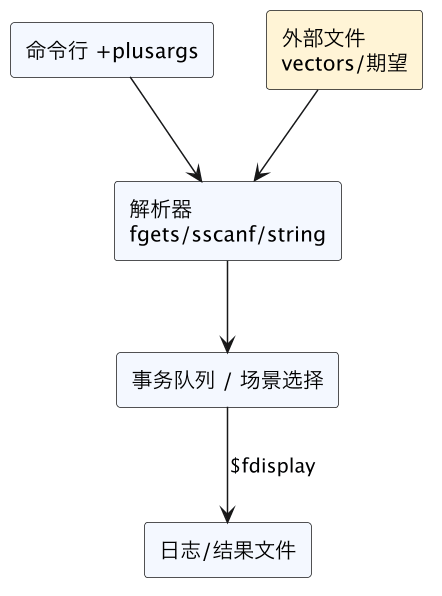
六、常见坑
$fopen返回 0(失败)不检查,后续写入静默丢失。%s读串、%h读向量用错,解析出垃圾值。- 不处理注释/空行,sscanf 失败仍使用未更新变量。
- 文件没
$fclose,缓冲未落盘导致日志不完整。 - plusarg 未提供时用默认值却误以为已传入,场景跑偏。
小结
总结
SystemVerilog 用 string 方法(len/substr/compare/atoi 与 $sformatf)组织和解析文本,用 $fopen/$fdisplay/$fclose 写文件、用 $fgets 逐行、$fscanf/$sscanf 按格式字段读取并以 $feof 判断文件尾(注意跳过空行注释、处理末行),再用 $value$plusargs/$test$plusargs 从仿真命令行传参,从而在不改代码的情况下由外部向量文件和 +PLUSARG 驱动并切换验证场景,文件描述符用前要查 0、结束要关闭落盘。