Appearance
本机 GitHub 连接不稳定:服务器 SSH 代理中转实践
更新时间:2026-08-20(记录
performance_profile站点运维中遇到的实际问题与排查过程) 所属:站点运维 · 网络排障 前置条件:一台可稳定访问 GitHub 的服务器(本案例为124.221.142.185,已配置 SSH 免密登录)
一、要回答的问题
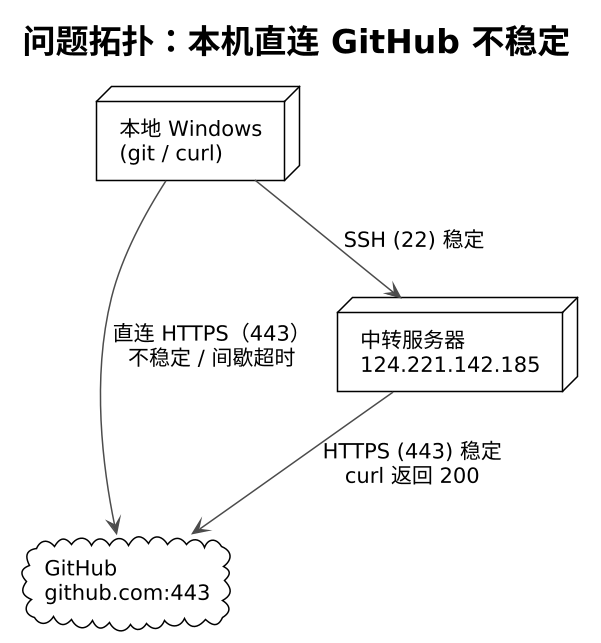
本机(Windows)通过 HTTPS 直连 GitHub 时频繁超时,git push / git fetch 不稳定。本实验要回答三个问题:
- 本机到 GitHub 的网络故障是什么形态(完全不通 / 间歇性 / 特定端口受限)?
- 能否利用现有服务器作为中转,让 git 稳定连通 GitHub?
- 中转方案有哪些坑,如何规避?
二、问题现象
| 现象 | 表现 |
|---|---|
git push 直连 | Failed to connect to github.com port 443 after 21000 ms: Timed out |
| 间歇性 | 有时能 fetch 成功(rebase 曾拉取到远程提交),随后 push 又超时 |
| 代理状态 | git config http.proxy / https.proxy 均为空,Windows 系统代理未开启,无代理软件 |
三、诊断过程
| 步骤 | 命令 | 结果 | 结论 |
|---|---|---|---|
| 1. 查 git 代理配置 | git config --get http.proxy / https.proxy | 空 | git 走直连 |
| 2. 查系统代理 | netsh winhttp show proxy、注册表 ProxyServer | 未配置 | 无系统级代理可用 |
| 3. 测本机→GitHub | Test-NetConnection github.com -Port 443 | 超时 / 不稳定 | 本机到 GitHub 443 出口不稳 |
| 4. 测服务器→GitHub | curl -sI https://github.com | http_code: 200 | 服务器到 GitHub 完全正常 |
关键判据:问题只发生在"本机 → GitHub"这一段链路上;服务器(腾讯云 124.221.142.185)访问 GitHub 稳定。因此思路是:把 GitHub 流量改道经服务器转发。
四、方案对比
| 方案 | 原理 | 优点 | 缺点 | 结论 |
|---|---|---|---|---|
| A. 本地 SSH 动态隧道(SOCKS5) | ssh -N -D 1080 服务器,git 走 socks5h://127.0.0.1:1080 | 零服务器改动、git 之外的工具(curl)也能复用 | 依赖"本地→服务器 22"链路稳定;隧道进程需保活 | ✅ 首次成功,后续不稳定 |
| B. 服务器中转(format-patch + git am) | 本地出补丁 → scp 到服务器 → 服务器应用并 push | 服务器直连 GitHub 稳定 | 变更需经服务器落地,提交者信息需保留 | ⭕ 备选,未执行 |
| C. 改用 SSH 方式连 GitHub | remote 改为 git@github.com,走 22 或 443 | 一次配置长期使用 | 需要配 SSH key;22 端口同样可能被限 | ⭕ 备选 |
| D. 服务器起 HTTP/SOCKS 代理服务 | 服务器装 tinyproxy 等,长期供本机使用 | 一劳永逸 | 需在服务器开放端口、维护服务 | ⭕ 备选 |
五、实施记录:方案 A(SSH 动态隧道)
5.1 建立隧道
powershell
# 后台建立 SOCKS5 隧道(-N 不执行远程命令,-D 1080 动态转发)
Start-Process -WindowStyle Hidden -FilePath ssh `
  -ArgumentList '-N','-D','1080','<user>@124.221.142.185'

# 验证隧道已监听
netstat -ano | Select-String ':1080\s.*LISTENING'   # 有输出即成功
5.2 走隧道推送(不落盘配置,仅对单次命令生效)
powershell
git -c http.proxy=socks5h://127.0.0.1:1080 push origin master- 使用
-c传参而非git config --global http.proxy:不污染全局配置,隧道挂了不影响日常直连尝试。 - 使用
socks5h://(而非socks5://):DNS 解析也走隧道,避免本地 DNS 污染。
5.3 实际效果
| 时间点 | 操作 | 结果 |
|---|---|---|
| 隧道建立后 | git push origin master(提交 18c8548) | ✅ 成功,服务器随后 fetch 到该提交 |
| 数分钟后 | 再次 git push | ❌ schannel: next InitializeSecurityContext failed: server closed abruptly |
| 数分钟后 | 重试 push | ❌ Failed to receive SOCKS response, proxy closed connection |
| 隧道重建后 | curl.exe -x socks5h://127.0.0.1:1080 -I https://github.com | ❌ 失败(隧道对 GitHub 仍不可达) |
六、失败分析与教训
6.1 隧道失效的可能原因
| 假设 | 依据 | 对策 |
|---|---|---|
| 本地→服务器 22 链路抖动 | 服务器 SSH 曾短暂无响应,重连后恢复 | 加保活参数 -o ServerAliveInterval=30 -o ServerAliveCountMax=4 |
| SSH 会话被中途掐断 | server closed abruptly | 用 nohup / 进程守护,断线自动重建 |
| 服务器出口到 GitHub 瞬时抖动 | 与服务器侧 curl 200 矛盾,可能性低 | 隧道内 curl 复测定位段点 |
| git schannel 与 SOCKS 兼容问题 | schannel: next InitializeSecurityContext failed | 尝试 -c http.sslBackend=openssl(需 git 带 openssl 编译) |
6.2 关键教训
- 代理方案不是一次配置终身可用:隧道是长连接,任何一端抖动都会导致失效,必须有"验证 → 重建"的闭环(重建后用
curl -x socks5h://...验证再 push)。 - 单条命令 -c 注入代理比全局配置更安全:避免代理失效时 git 静默走失败代理。
- 先验证再执行:push 前先用隧道内
curl -I https://github.com确认链路,避免把时间花在失败重试上。
七、后续可选方向
- 方案 C(推荐长期):配置 GitHub SSH key,remote 改为
git@github.com,必要时走ssh.github.com:443(443 端口 SSH 通道,兼容被限制 22 的场景)。 - 方案 B:
git format-patch导出本地提交 →scp到服务器 → 服务器git am后 push,保持本地 author 信息,适合服务器直连 GitHub 的场景。 - 方案 D:在服务器部署常驻代理(tinyproxy / danted),本机系统级配置代理,长期稳定但增加服务器暴露面。
八、一句话总结
本机直连 GitHub 不稳定时,可借道"能稳定访问 GitHub 的服务器"建立 SSH 动态隧道(SOCKS5)中转 git 流量——首次成功但长连接易抖动,须配合保活参数与"先 curl 验证、再 push"的闭环;长期更推荐 SSH 直连或服务器侧常驻代理。